After writing UTME and completing post UTME or screening, the next big question most candidates ask is, “Have I been given admission?” This is where checking your JAMB admission status becomes very important. Many students miss admission simply because they do not understand how the process works or they check it the wrong way.
This article explains the JAMB admission status checking process in a clear and simple way. You will learn how to check your admission status, what different admission messages mean, common problems candidates face, and what to do after seeing your status. If you are seeking admission for the 2026 academic session or any other year, this guide will help you avoid mistakes.
What Is JAMB Admission Status
JAMB admission status shows whether an institution has offered you admission or not. It is displayed on the JAMB portal and JAMB CAPS. This status is the official confirmation of admission recognized by JAMB.
Even if a school releases its own admission list, it is not complete until it reflects on the JAMB portal. That is why checking JAMB admission status is compulsory for all candidates.
Why Checking JAMB Admission Status Is Important
Many candidates focus only on school admission lists and forget JAMB CAPS. This can cause serious problems later.
Checking your JAMB admission status helps you:
- Confirm if you have been offered admission
- Accept or reject admission on CAPS
- Know if your admission is still pending
- Avoid losing admission due to delay
- Complete registration in your school correctly
Without accepting admission on JAMB CAPS, your admission is not valid.
When Does JAMB Admission Status Update
JAMB admission status does not update for everyone at the same time. Admission is processed in batches.
Your status may change when:
- Your school uploads a new admission list
- JAMB approves the admission
- You meet all requirements like subject combination and O Level result
- Your O Level result is uploaded on the portal
This means you should check your JAMB admission status regularly.
Requirements To Check JAMB Admission Status
Before checking your admission status, make sure you have the following:
- JAMB registration number
- Email address and password used for JAMB registration
- Internet enabled phone or computer
Once these are ready, you can proceed.
How To Check JAMB Admission Status On JAMB Portal
This is the most common method many candidates use. Follow the steps carefully.
Step 1: Visit The JAMB eFacility Portal
Open your browser and go to the official JAMB eFacility portal.
Step 2: Login To Your Profile
Enter your email address and password used during JAMB registration.
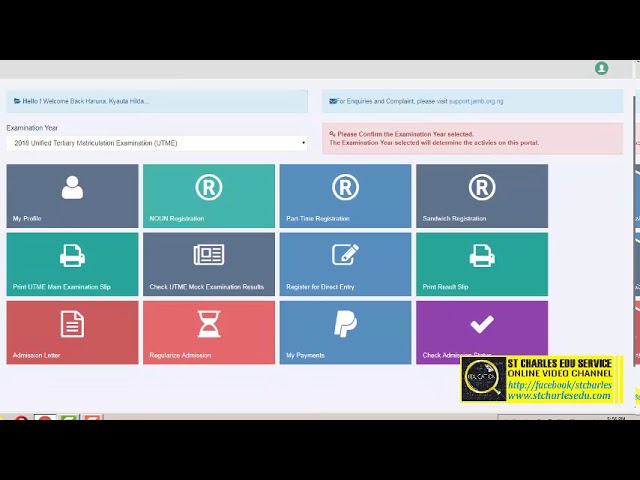
Step 3: Click On Check Admission Status
After logging in, look for the option that says “Check Admission Status” and click on it.
Step 4: Select Examination Year
Choose the correct examination year, for example 2026.
Step 5: Check Your Status
Click the check button to see your admission status.
You may see messages like admitted, not admitted, or admission in progress.
How To Check JAMB Admission Status On CAPS
JAMB CAPS is the most important platform for admission. It allows you to accept or reject admission.
Step 1: Login To JAMB Portal
Use your email and password to access your profile.
Step 2: Click On CAPS
Locate and click on “Check Admission Status,” then select “Access My CAPS.”
Step 3: Click On Admission Status
Inside CAPS, click on “Admission Status” to view your offer.
Step 4: Accept Or Reject Admission
If you have been offered admission, you will see options to accept or reject it. You must click accept if you want the admission.
This step is compulsory.
Meaning Of Different JAMB Admission Status Messages
Many candidates get confused by the messages they see. Below is what each message means.
Admitted
This means you have been offered admission. You should accept it immediately on CAPS.
Not Admitted
This means you have not been offered admission yet. It does not always mean you will not be admitted later.
Admission In Progress
This means your admission is being processed. It may change to admitted once completed.
Recommended
This means the school has recommended you for admission, but JAMB has not approved it yet.
Admission Offered But Not Accepted
This means you were offered admission, but you have not accepted it on CAPS.
What To Do After Accepting Admission On JAMB CAPS
Accepting admission is not the final step. After acceptance, you must take the following actions.
Print JAMB Admission Letter
Once admission is accepted, print your JAMB admission letter from the portal. This document is required during school clearance.
Print Original JAMB Result Slip
The original result slip shows your passport and full details. Most schools request it.
Proceed With School Registration
Visit your institution’s portal to complete acceptance fee payment, screening, and registration.
Keep All Documents Safe
Always keep printed documents and receipts. They may be needed later.
Common Problems When Checking JAMB Admission Status
Many candidates face issues while checking their status. Here are common problems and solutions.
No Admission Yet
Be patient. Admission is released in batches. Keep checking.
CAPS Not Showing Any Option
This may be due to missing O Level result or incorrect subject combination.
Unable To Accept Admission
Check if you uploaded your O Level result correctly. Also confirm your internet connection.
Wrong Login Details
Use the correct email and password. If forgotten, use the password recovery option.
Reasons Why Admission May Be Delayed Or Denied
Understanding why admission is delayed helps you correct issues early.
Common reasons include:
- Wrong UTME subject combination
- Low JAMB score
- Incomplete O Level result upload
- Not meeting school cut off mark
- Errors in personal details
Always check the admission requirements of your chosen institution.
Can Admission Change After Being Rejected
Yes, admission can still change in some cases. If you reject an admission, you may still be considered for another course or institution if available. However, rejecting admission can be risky.
It is safer to accept first, then make decisions later if allowed.
How Often Should You Check JAMB Admission Status
There is no fixed number. However, checking once or twice a week during admission period is enough. Avoid checking every hour to reduce stress.
Admission processing can take weeks or even months.
Final Thoughts On JAMB Admission Status Checking Process
Understanding the JAMB admission status checking process helps you stay informed and avoid costly mistakes. Always rely on JAMB CAPS for confirmation, not rumors or unofficial sources.
Check your status regularly, upload all required documents, and accept admission on time. Missing any step can affect your chances.
If you follow the steps explained in this article, you will handle the admission process with more confidence and clarity. For more updates on JAMB, admissions, and education news, keep reading related guides and announcements.
Leave a Reply